 Mosaizer Pro 12 -
Help |
Mosaizer Pro 12 -
Help
Stone mosaic data
Stone mosaic
data Three files will be generated and saved in the default save
location (initial default:'My pictures').
When the user changes the save location (e.g. by saving
a mosaic picture), this default save stone data location is changed as well.
These are the files: When the option is activated the Cell size format
will change from pixels to mm. The range of the cell size is then fixed from 10 to
40 mm. The grout width is fixed at 1 mm. In case you want to increase
the grout size, simply add that value to the stone/cell size. You can only select a grout
size in millimetres. For example:
Stone mosaics are already
thousands year old.... but still have a vivid community of people who like to
use Mosaizer Pro to recreate mosaics and build the mosaic with real coloured
pieces of stone (and ceramics).
The user can activate this option
to automatically save the mosaic data to create stone mosaics. This is done by
activating the option 'Save stone data'
in the
'Tools' menu.
TileDetails.csv: this file contains the amount of
stone tiles that is used in the mosaic, incl. some basic statistics. The file
can be read as a text file in e.g. NotePad, but also as a spreadsheet in
Microsoft Excel or Open Office Calc.
Mosaic_layout.jpg: the picture is the
visualization of each of the tiles, referenced by a number. The number
corresponds with the number and (stone) tile name as summarized in the TileDetails.csv file and TileDetails.jpg file. This file also
has a printed scale in cm on both horizontal and vertical axes. This picture
also shows a 'light' version of each of
the coloured stones, as a practical colour reference of the entire scene.
TileDetails.jpg: the overview of (stone) tiles and
corresponding reference numbers.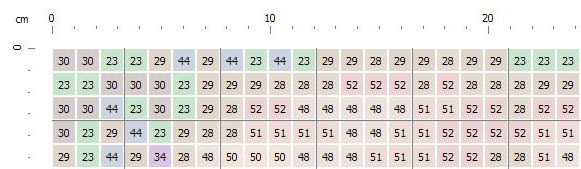
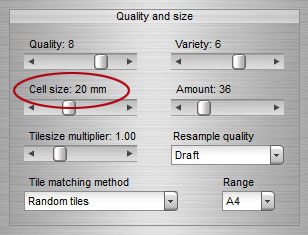
your stone size is 20x20 mm and the
fixed grout size is 1 mm. The scale on the mosaic layout picture will then
calculate 20 + 1 = 21 mm for each stone tile.
your stone size is 25x25 mm and you want a grout width
of 2 mm: select the Cell size = 26 mm and since the grout size is fixed at 1 mm the scale
on the mosaic layout picture will then be calculated as 26 + 1 = 27 mm. Just
as you intended.